Wednesday, May 28, 2014

Sublime Text 3 and ColdFusion

The instructions on the git site for the Sublime Text 3 ColdFusion plugin says that the only way to install the plugin is to use Git. https://github.com/SublimeText/ColdFusion

I had trouble getting it to work on a fresh build of Sublime Text 3 because the build from 22 Sep 2013 appears to be broken. The previous build from 17 Sep 2013 works fine, but after installing the broken build, I had to wipe out the Sublime Text 3 settings entirely to get the previous build to work.

Install Git
Download and install the latest version of Git.

Choose the middle option: "Use Git from the Windows Command Prompt"
(By default, "Use Git from Git Bash only" is checked.)


Accept the defaults for the rest.

Download and Install Sublime Text 3
http://www.sublimetext.com/3

Install the ColdFusion plugin
run CMD.EXE and type the following commands:
The git checkout line above reverts your clone to the Sept 17, 2013 build.

Run Sublime Text 3 and open a ColdFusion page...


The familiar syntax coloring should be there.

Wiping out Sublime Text 3 settings
If you are still having trouble, wipe out the sublime text 3 settings by deleting this folder:
%APPDATA%\Sublime Text 3
It will be recreated the next time you run Sublime Text 3, but be prepared to reinstall all plugins.


Monday, April 21, 2014

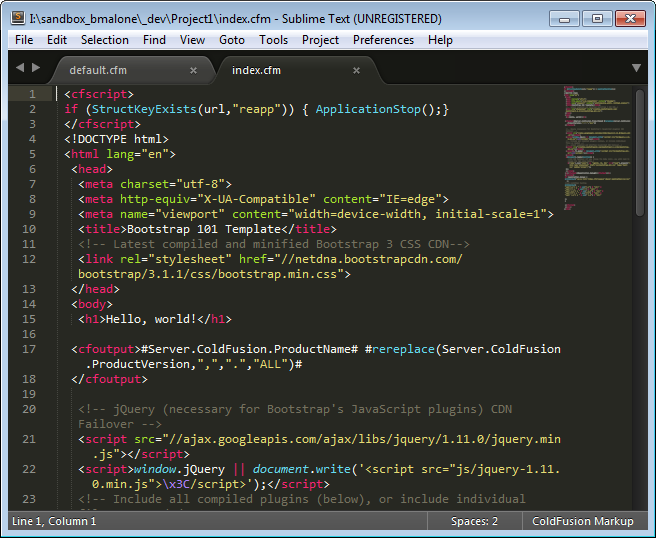
Bootstrap 3 HTML Template with CDN Failover for JS and CSS

I wanted to create a nice, simple template for Bootstrap 3.0 that uses a failover technique I learned about at a recent ASP.NET user group meeting (Thanks Alek Davis).

The Getting Started section of http://getbootstrap.com shows a CDN example, but the HTML template that assumes you have local Bootstrap JS and CSS files.  I found lots of examples of Javascript failover techniques, most notably Scott Hanselman’s CDNs fail, but your scripts don’t have to… blog post. A little more Googling turned up this technique to see if Bootstrap loaded properly. I adapted the code from github to the shorthand code from Scott’s blog to create this nice Bootstrap 3 HTML template that attempts to load JQuery and the Bootstrap 3 JS and CSS files from CDN. Should any fail, it loads the files locally.

Note: This template is expecting the following local resources:
js/jquery-1.11.0.min.js
js/bootstrap.min.js
css/bootstrap.min.css

May not be IE compatible!

 <!DOCTYPE html>  
 <html lang="en">  
  <head>  
   <meta charset="utf-8">  
   <meta http-equiv="X-UA-Compatible" content="IE=edge">  
   <meta name="viewport" content="width=device-width, initial-scale=1">  
   <title>Bootstrap 101 Template</title>  
   <!-- Latest compiled and minified Bootstrap 3 CSS CDN-->  
   <link rel="stylesheet" href="//netdna.bootstrapcdn.com/bootstrap/3.1.1/css/bootstrap.min.css">  
  </head>  
  <body>  
   <h1>Hello, world!</h1>  
   <!-- jQuery (necessary for Bootstrap's JavaScript plugins) CDN Failover -->  
   <script src="//ajax.googleapis.com/ajax/libs/jquery/1.11.0/jquery.min.js"></script>  
   <script>window.jQuery || document.write('<script src="js/jquery-1.11.0.min.js">\x3C/script>');</script>   
   <!-- Include all compiled plugins (below), or include individual files as needed -->  
   <!-- Latest compiled and minified JavaScript CDN Failover-->  
   <script src="//netdna.bootstrapcdn.com/bootstrap/3.1.1/js/bootstrap.min.js"></script>  
   <script>$.fn.modal || document.write('<script src="js/bootstrap.min.js">\x3C/script>');</script>  
   <script>  
   $(document).ready(function() {  
     //CSS CDN Failover (If you change the body color, you will need to change the rgb value below.)  
     $('body').css("color") == 'rgb(51, 51, 51)' || $("head").prepend("<link rel='stylesheet' href='css/bootstrap.min.css' type='text/css' media='screen'>");  
   });  
   </script>  
  </body>  
 </html>  

References:
Scott Hanselman: CDNs fail, but your scripts don't have to - fallback from CDN to local jQuery
GitHub MaxCDN / bootstrap-cdn: Check if Bootstrap is loaded #111
Bootstrap Website: http://getbootstrap.com

Thursday, April 10, 2014

ColdFusion 10 CFLOOP bug with decimal steps

Back in the ColdFusion MX 6.1 era, I stumbled across a bug. A CFLOOP tag with a step of 0.2 would inexplicably skip a number (32.0, I believe) as it counted up. The bug persisted through version 7.x. I had a workaround in place, so I didn’t give it much thought after that.

Recent ColdFusion conversations made me think of this bug, so I decided to code up a quick test to see if it was still an issue with CF10. What I discovered was far worse than I remembered.

Start with a simple loop from 0 to 40 with a step of 0.2. Display each step and add a comma after all but the last number:
<cfloop index="i" from="0" to="40" step="0.2">
      <cfoutput>#i#</cfoutput>
      <cfif i LT 40>, </cfif>
</cfloop>

Hmmm… 40 is missing. When counting up by integers, 40 is included. This was the first hint that something was not quite right.


The list is a bit tough to read, so let’s break it up by inserting a <BR> before each integer (skipping the initial zero).

<cfloop index="i" from="0" to="40" step="0.2">
      <cfif int(i) EQ i and i GT 0><BR></cfif>
      <cfoutput>#i#</cfoutput>
      <cfif i LT 40>, </cfif>
</cfloop>

This should have produced a nice column of integers with each row ending in x.8! 

There is a line break after 0.8, as expected, but no line breaks again until 8.8 and no more again until 37.8? This makes no sense. Since the problem occurs in the first 10 digits, let’s reduce the TO value to 10 and include “int(i)” and the result of the evaluation “int(i) eq i” in the output:
<cfloop index="i" from="0" to="10" step="0.2">
      <cfif int(i) EQ i and i GT 0><BR></cfif>
      <cfoutput>#int(i)# EQ #i#:#int(i) EQ i#</cfoutput>
      <cfif i LT 10>, </cfif>
</cfloop>


So, this output is telling me that when i = 2 , int(i) EQ i evaluatees to 1 EQ 2! Worse, it is saying 4 <> 4, 5 <> 5, 6 <> 6 but 7 = 7? I tried the other rounding functions: FIX, ROUND and CEILING with varying degrees of weirdness. (ROUND appeared to work, but I don’t trust it completely.) I also tried JavaCast() but the results were still off. The string comparison function COMPARE (x,y) had the same problem. When I tried int(2.0) by itself, it did not yield “1”, so I suspect the problem is data type conversion in the processing of the loop steps.

The Workaround
I used the same workaround here that I used years ago with the original problem. Multiply the FROM, TO and STEP by 10 and divide the value as appropriate inside the loop.
<cfloop index="i" from="0" to="100" step="2">
      <cfif i MOD 10 EQ 0 and i GT 0><BR></cfif>
      <cfoutput>#numberformat(i/10,"09.9")#</cfoutput>
      <cfif i LT 100>, </cfif>
</cfloop>

And the results turn out as expected:

Conclusion
Avoid decimal steps.

Thursday, February 13, 2014

ASP.NET MVC5 (Novice) Protecting your site with a login wrapper

The default MVC framework includes login and registration pages. They are functional, but by default the main pages in the site are not configured as login-protected.


As with much of MVC, the login wrapper has been abstracted to a configuration component – a filter in this case.


In the solution explorer under ~/App_Start, double, double-click “FilterConfig.cs”


Add the following lines to RegisterGlobalFilters:


filters.Add(new System.Web.Mvc.AuthorizeAttribute());

filters.Add(new RequireHttpsAttribute());


I disabled RequireHttpsAttribute during development.


The entire site is now protected by the login wrapper with the exception of the account related pages. The account pages are excluded from the login wrapper because of the [AllowAnonymous] attribute.


For a much more comprehensive treatment, see “Deploy a Secure ASP.NET MVC 5 app with Membership, OAuth, and SQL Database to a Windows Azure Web Site” by Rick Anderson.


This is a beginning-to-end explanation of how to create and deploy a site. To skip to the security section, scroll to the middle of the page and look for “Protect the Application with SSL and Authorize Attribute”. He even explains how to create security levels!


ASP.NET MVC5 (Novice) Creating different layouts for different views

I’m creating a simple login-protected site. I want to have a main layout for the core site and a separate layout for the login and other account-related pages.


It took me a while to stumble on the most ‘elegant’ answer for ASP.NET MVC 5. The easiest/best solution (also restated here) is to copy _ViewStart.cshtml from the View folder root to the view folder that you want to style differently.


Create a new layout in ~/Views/Shared … (_Layout-Account.cshtml in my case)


and edit ~/Views/Account/_ViewStart.cshtml to point to the new Layout.


This will override the main _ViewStart.cshtml in the Views folder. There are many other approaches, like adding conditional logic to the main _ViewStart.cshtml page, but creating a _ViewStart.cshtml page for each view you


Shailendra Chauhan made an excellent blog post exploring many different ways of rendering layouts in ASP.NET MVC.

Thursday, December 26, 2013

MVC 5 Entity Framework and Dealing with Multi-key tables

I have a legacy table with 100 columns and 3 key fields. The Create, Delete, Details, and Edit pages created by adding “MVC 5 Controller with views, using Entity Framework” can only handle single key tables out of the box.

The Database
The data I need is in a single table on Microsoft SQL Server 2008 R2. The table I’m using has 3 keys: [Order_], [Company_Name] and [Acct_]

In the server explorer, click “Add Connection” and follow the prompts to add the table.

Adding the Entity Data Model
Return to the Solution Explorer and right click on Models and [Add] -->[ADO.NET Entity Data Model].
(New Item --> Data --> ADO.NET Entity Data Model)

I called my model [Order]

Since the database already exists, choose [Generate from Database]

The name of the database is “temp” (not my choice and not something I can change), so leaving defaults on the data connection page means the entity connection settings in Web.Config will be “tempEntities”

As of 12/24/2013, Entity Framework 6.0 isn’t widely supported, so I chose 5.0

Choose the specific table(s) needed. In my case, I just need one: [ORDERS]
Again, leaving the default value, the Model Namespace is tempModel. Click [Finish]


The edmx diagram is created. At the top, you can see the 3 keys.

Build the Project
You need to build the project at this point before continuing or the controller build process will error out.

Adding the Controller
Right click on Controllers and add [Controller…] to add a controller scaffold.

Choose the “MVC 5 Controller with views, using Entity Framework”

I called my controller [OrderController]. Choose the Model class we just created [ORDER (WebApplication4.Models)] and the Data context class is the one we created [tempEntities (WebApplication4.Models)].

When this step completes, you’ll see the [OrderController.cs] under Controllers and an [Order] folder under Views that contains Create, Delete, Details, Edit and Index.cshtml.

Browsing for the First Time
The temp.ORDERS table has about 48,000 rows and over 100 columns (!). I didn’t need all of the columns, so I cut out all except the three key fields for this exercise.

@model IEnumerable<WebApplication4.Models.ORDER>

@{
    ViewBag.Title = "Index";
}

<h2>Index</h2>

<p>
    @Html.ActionLink("Create New", "Create")
</p>
<table class="table">
    <tr>
       
        <th>
            @Html.DisplayNameFor(model => model.ORDER_)
        </th>
        <th>
            @Html.DisplayNameFor(model => model.COMPANY_NAME)
        </th>
        <th>
            @Html.DisplayNameFor(model => model.ACCT_)
        </th>
        <th></th>
    </tr>

@foreach (var item in Model) {
    <tr>
        <td>
            @Html.DisplayFor(modelItem => item.ORDER_)
        </td>
        <td>
            @Html.DisplayFor(modelItem => item.COMPANY_NAME)
        </td>
        <td>
            @Html.DisplayFor(modelItem => item.ACCT_)
        </td>
        <td>
            @Html.ActionLink("Edit", "Edit", new { /* id=item.PrimaryKey */ }) |
            @Html.ActionLink("Details", "Details", new { /* id=item.PrimaryKey */ }) |
            @Html.ActionLink("Delete", "Delete", new { /* id=item.PrimaryKey */ })
        </td>
    </tr>
}

</table>

*Notice the commented “id=item.PrimaryKey” parameter.

Even with this reduced display, 48,000 rows still crashed my browser, so I added a counter that breaks out of the loop after the first 50 rows.

@{int counter = 0;}
@foreach (var item in Model) {
    counter = counter + 1;
    if (counter == 50) { break; }
                …

This results in output that looks like this:


Since the primary key is commented out of the edit, details and delete links, clicking any of them at this point will cause a 400 error.

The account I’m using does not have write access to the database, so “Details” is the only link I will activate. Uncommenting [Details] and replacing “PrimaryKey” with one of the real keys [ORDER_]will result in an exception:

            @Html.ActionLink("Details", "Details", new { id = @item.ORDER_}) |


“The number of primary key values passed must match number of primary key values defined on the entity.” The entity requires three key values and I am only passing in 1. A quick look at the tempController.cs shows how the [Details] action is handled:

The [id] value is passed in by querystring and is used by Find(id)to retrieve the proper record. It took a bit of searching to learn how to use Find() with multiple keys. A comma delimited list will work , for example: db.ORDERS.find(firstcolvar, “plain_text”, 3) looks for 3 keys.
#1 specified by the var firstcolvar,
#2 looks for the plain text “plain_text” and
#3 looks for the integer 3.

Note: The values must match the column data type.

The variable “id” is defined as a string by default, so I decide to pass all 3 key values in as a comma delimited string. I edited the Details Html.ActionLink code on Index.cshtml as follows:

@Html.ActionLink("Details", "Details", new {id= @item.ORDER_+','+@item.COMPANY_NAME+','+@item.ACCT_}) |

All 3 key values, separated by commas.

In the ActionResult Details inside OrderController.cs, I need to parse each of the 3 keys out. I use split to pull the values into an array of strings, then I use each of the values individually in the Find() method.

One tricky part: the third key is an integer, not a string, so I cast the value in the call to the Find method (highlighted).
            string[] splitid = id.Split(',');
            ORDER order = db.ORDERS.Find(splitid[0],splitid[1],Convert.ToInt32(splitid[2]));

Another tricky part: the order of the keys is important, and I have the order wrong above!

The class ORDER in the Models was created automatically from the SQL table.

The order of the keys presented to the find method must match the order of the keys in the Models/Order.edmx/Order.tt/ORDER.cs file.


Company_Name first, ACCT_ second, and ORDER_ third. The ActionLink in Index.cshtml becomes:

@Html.ActionLink("Details", "Details", new { id = @item.ORDER_ + ',' + @item.COMPANY_NAME + ',' + @item.ACCT_ }) |

And the ActionResult in OrderController becomes:

            string[] splitid = id.Split(',');
            ORDER order = db.ORDERS.Find(splitid[1], int.Parse(splitid[2]),splitid[0]);

At this point the details link works!


The next goal is to figure out how to do this with a complex query (in LINQ?) against 2 databases, one of which does not have a key.

Friday, December 6, 2013

Learning One ASP.NET MVC 5

MVC 5 Tutorials
MVC 5 Books
MVC 4 Books

What I like most about these books is they both take a real world scenario and build it out completely, explaining details in a way that video tutorials can't. It is not easy for a novice to translate the MVC 4 examples to MVC 5, but if you build for MVC 4 in Visual Studio 2013, you can follow along with the MVC 4 books almost exactly.

2/10/2014 Removed most of my editorial blather.
4/14/2014 Wrox publish date bumped out yet again.
8/6/2014 Wrox finally released their book. I have changed language stacks to ColdFusion/Java, so this is the last time I will update this page or my ASP.NET content.